Cloud computing services have revolutionized the approach that businesses have towards data storage, software development, web hosting, and many more processes. Rather than purchasing expensive physical hardware and managing them, now businesses can use computing resources through the internet.
Currently, all sorts of businesses use cloud services to store data, run applications, perform database functions, networking, cybersecurity, and other tasks related to information technologies.
Enterprises can pick various cloud computing services depending on their specific needs. Whereas some enterprises need basic cloud services such as cloud storage, there are others that need full cloud services for applications, databases, analytics, and cybersecurity.
There are also industrial cloud services that industrial enterprises may require to manage production data, connected devices, supply chain management, and industrial operation systems.
In this article, you will learn what cloud computing services are and how they work, different types of cloud services, their main advantages, and how to pick the appropriate cloud solution for your enterprise.
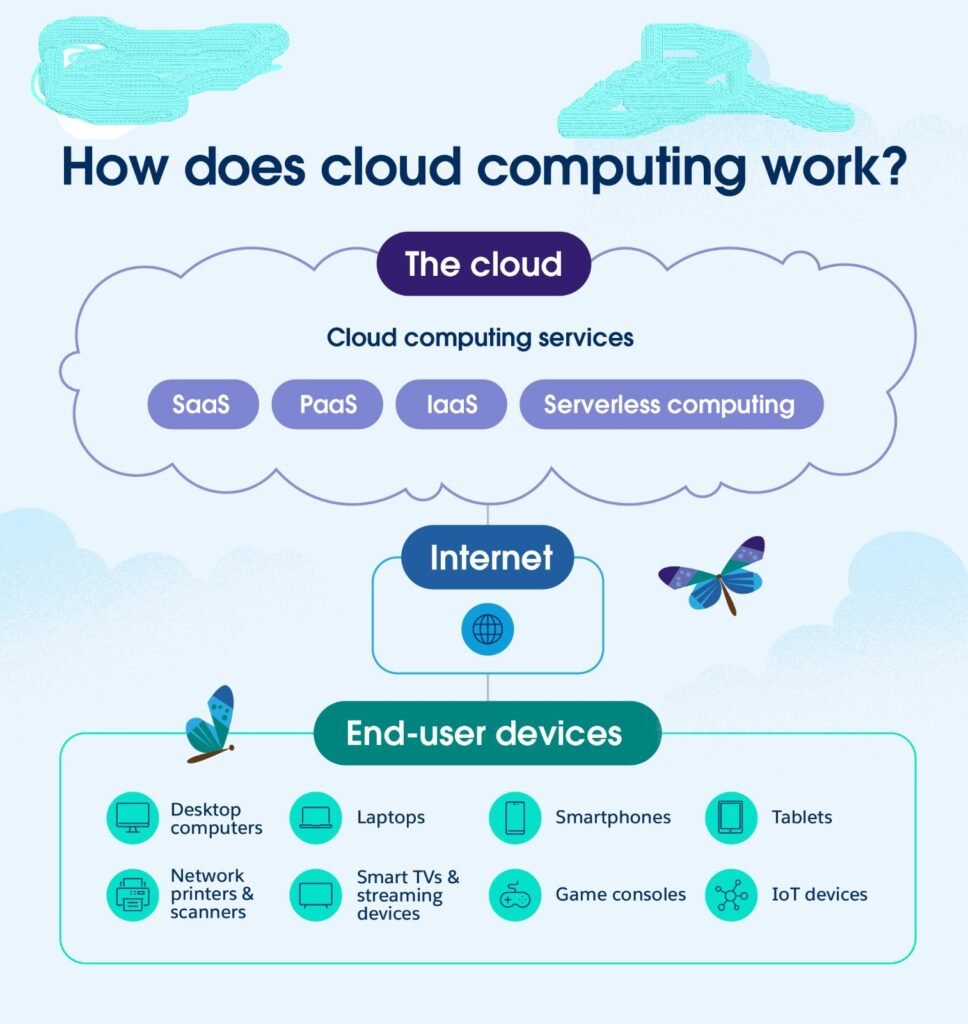
How Does Cloud Computing Service Work?
A cloud computing process involves Internet connectivity, data center, servers, virtualization, storage devices, and software.
In cases where a business subscribes for a cloud computing service, its data or applications may be hosted at remote server facilities belonging to the cloud computing service provider.
The client will connect to the service through the Internet while the service provider takes care of much of the underlying technical infrastructure.
For instance, consider a situation where a business requires 5 TB of storage facility.
In the conventional arrangement, the business may require to buy physical storage server for itself which also demands room, electricity, maintenance, security, and technicians.
On the other hand, in case of cloud storage services, the business may buy or subscribe for the storage required from the cloud computing service provider.
While the service provider will take care of the physical infrastructure, the client will utilize the storage facility through online connections.
Types of Cloud Deployment Models
The clouds in computing can also be classified based on the way the cloud environment is deployed.
Public Cloud
In a public cloud environment, the cloud environment is run by an external cloud service provider. Businesses use the underlying infrastructure of the service provider while maintaining their own accounts and applications separately from each other.
Public clouds are popular in that businesses get access to computing resources without buying physical hardware.
They can also scale computing resources based on their changing needs.
Private Cloud
The private cloud is created for one business alone.
It offers better control over the cloud environment and can be useful in the case of businesses with high security and compliance requirements.
Private clouds can be internally run or outsourced to a third party.
Hybrid Cloud
The hybrid cloud involves both public and private clouds together.
For instance, businesses may host their sensitive data and applications in private clouds while using public clouds for other purposes.
Business Cloud Services
Business cloud services refer to cloud computing tools that are created to assist in the functioning of an organization.
They may help organizations to handle communication, data, software, client relationships, finance management, collaboration, and other activities.
The most popular business cloud services include the following:
Cloud Storage
The service of cloud storage helps organizations to store various types of documents, images, databases, backups, and other files online.
The employees can gain access to the information that is allowed for them independently of their local storage devices.
In addition, cloud storage can be used for data backup, file sharing, and disaster recovery.
Cloud Backup
There is a necessity to back up the data in order not to lose it due to such reasons as hardware failures, accidental deletions, cyber attacks, and others.
The cloud backup services allow automatic backups of valuable data to remote storage places.
Cloud Email and Collaboration
Organizations use cloud services for emails and collaboration.
It means that employees are able to communicate, share documents, arrange meetings, and collaborate from other locations.
Potential Advantages of Cloud Computing Services
There are various benefits that cloud computing services might bring to businesses.
Reduced Hardware Expenses
Businesses might have to spend less money on purchasing servers and other hardware.
Instead, they could buy cloud computing services depending on their needs.
It might help companies lower some IT infrastructure expenses.
Scalability
The main benefit of cloud computing services is scalability.
A business might increase its computing power in case of increased demand.
For instance, an online shop might need more computing power in case of a large promotion event. Cloud computing service would allow this.
When demand falls, a business could reduce computing resources.
Remote Access
It is possible to enable remote access for authorized personnel in order to access certain applications and data.
It allows working remotely, hybrid teams, and businesses with offices in various parts of the world.
Business Continuity
Cloud computing might help businesses maintain business continuity by offering remote backup, redundant infrastructure, and disaster recovery.
In case of system failure, businesses might be able to restore services through another environment.
Who Can Benefit from Using Cloud Computing Services?
Cloud computing can be adopted by all sorts of organizations.
Small Businesses
Small firms can utilize cloud computing services without creating extensive IT teams.
They can benefit from such cloud services as accounting, emails, storage, communication, and customer relationship management systems.
Large Firms
Large corporations can employ cloud computing for such purposes as application, analysis, databases, software development, and large scale computations.
Startups
Young firms can use cloud-based infrastructures for launching their digital products without investing huge amounts in hardware.
Healthcare Organizations
Healthcare providers can adopt cloud infrastructures for applications, data management, collaboration, and other allowable applications that comply with security and other requirements.
Financial Organizations
Firms in the financial sector can apply cloud computing technologies for analytics, applications, infrastructures, and data processing under strict security controls.
Manufacturers
Manufacturing companies can benefit from using industrial clouds for manufacturing operations, machine data, supply chain management, and analytics.
Cloud Computing Services – How to Pick Up, Manage, and Utilize Them
We touched upon the fundamentals of cloud computing services, their types, deployment models, use cases in business and industry, and main advantages.
In the second part, we will consider how to select the most appropriate cloud service, manage costs, increase security, know the problems and be ready for the future of cloud technologies.
Selecting the Appropriate Cloud Computing Services
Choosing the most appropriate cloud solution is a critical decision that any company faces. Each organization has its needs.
A small company might require only cloud storage, email services, and some basic business software. While a big enterprise will need databases, virtual machines, analytics, security services, and complicated cloud infrastructures.
Prior to selection of the provider or cloud solution, organizations should learn about their current IT infrastructure and goals.
Pricing Structures for Cloud Services
Various pricing structures are employed by cloud vendors.
Some services use a pay-per-use basis. Others provide monthly or annual subscriptions.
The following are some factors that are used to determine costs:
• Compute capacity
• Storage space
• DATA transfers
• User number
• Database utilization
• Licenses for software applications
• Services for support
• Security enhancements
It is advisable for businesses to compute their total cost of ownership (TCO) instead of simply considering the per month cost.
This is because the cost may increase due to additional charges such as those for storage, data transfers, backups, and support services.
Cloud Migration Techniques
Various cloud migration techniques exist.
Rehost
Rehosting is the technique where application is moved to the cloud almost unchanged.
This is the relatively fast method, as no extensive redesign of the application is necessary.
Replatform
Replatforming consists in modifying the application to make it work better in the cloud environment.
Such modification is usually done to get cloud benefits without complete application redesign.
Refactor
In cloud refactoring, the application is modified to better use its cloud-specific features.
While it is a more complex task, cloud refactoring can bring more benefits in the long run.
Retain
There are cases when the application is retained in the existing environment.
This situation can arise due to difficulties with application migration or lack of business necessity to do so.
Retire
Applications that are old and no longer used can simply be retired instead of migrating.
This reduces unnecessary infrastructure.
Cloud Backup and Disaster Recovery
Loss of data may have some consequences for a business.
It might happen due to hardware failure, accidental erasure, cyber attacks, natural disasters or even some issues with software.
Cloud backup providers allow creating copies of data in remote locations.
Disaster recovery may be conducted through cloud computing services as well.
A disaster recovery plan should contain:
- data that needs protection;
- frequency of backups;
- locations of storage;
- system recovery process;
- responsible persons;
- uptime requirements.
Two key terms include Recovery Point Objective (RPO) and Recovery Time Objective (RTO).
Recovery point objective specifies how much of recent data may be lost by a business.
Recovery time objective specifies the speed of system recovery.
Common Issues of Cloud Computing
Even though cloud computing offers multiple benefits, it is not a flawless technology.
The organization should be aware of potential problems of the technology before investing in it.
Dependency on the Internet
Most cloud solutions rely on the internet.
In case the internet connection stops working, accessing cloud solutions may be problematic.
Organizations using a large number of cloud applications should think about reliable internet connections.
Vendor Lock-In
Cloud vendor lock-in is when the company becomes heavily dependent on one vendor’s solutions.
Switching to another vendor may prove costly or time-consuming.
The organization can avoid vendor lock-in if it has carefully thought about its architecture and data portability.
Unexpected Expenses
The use of cloud computing services can escalate unexpectedly.
Therefore, organizations should think about implementing the policy of cloud cost management from the start.
Security Misconfiguration
Cloud platforms can be secure, but some misconfigurations can bring security risks.
These can include too broad permissions, unsecured storage, weak authentication, or improper firewall configurations.
Regular security audits can minimize such issues.
Skills and Training
Cloud technology is a technical solution.
Cloud Computing and Artificial Intelligence
The connection between cloud computing and artificial intelligence (AI) is gaining significance.
AI processes need significant computational capacity and storage.
Cloud can help in building the necessary infrastructure to host the AI computations.
Companies can leverage cloud computing for various activities, such as:
- Analysis of data
- Customer support
- Digital document management
- Image recognition
- Forecasting
- Recommendation engines
- Prevention of fraud
- Business process automation
There is no need to invest in hardware since cloud computing can be utilized on an as-needed basis.
Comparison of Cloud Computing Services and Traditional IT Infrastructure
Traditionally, IT involves the business having to invest in physical hardware such as servers, storage, networking infrastructure, and other such items.
However, cloud computing is different in that businesses have access to all these resources via a service provider.
Feature Traditional IT Cloud Computing
Hardware Generally owned by business Generally provided by provider
Initial expense Generally more Often less
Scalability Necessitates change in hardware Generally easier
Maintenance Responsibility of business Generally shared or managed by provider
Remote access Generally necessitates further setup Generally inherent in many services
Resource capacity Fixed Changeable
Deployment Time consuming Often faster
The best solution for the organization depends upon several factors.
Conclusion about Cloud Computing Services
Today cloud computing services have become an integral element of business technology.
From basic cloud storage to sophisticated business cloud services and industrial cloud services, businesses can implement cloud technologies in a variety of applications.
There is scalability, remote access, flexible infrastructure, backups, collaboration, and access to up-to-date technologies such as artificial intelligence and advanced analytics in cloud computing.
However, businesses should address a number of issues such as security, cost management, compliance, performance and vendor management.
The right cloud computing strategy is based on understanding business needs.
It requires comparing providers, understanding pricing, considering security measures, planning migration and monitoring cloud operations.
When implemented and managed correctly, cloud computing may become not only the IT service but the basis for digital transformation and further development.